1 · ENTRY
How users reach the Lobby
The Lobby replaces Home as the default post-login landing (slide 6).
Returning users can skip via “Go to Home feed”. Variant A (primary): the bottom bar is unchanged —
the Lobby is also reachable from a new hamburger-menu “Lobby” item.
2 · FOUR HALLWAYS + AN EXPLORE BLOCK (slides 5–6)
One Lobby, four hallways — where each tile leads
Tap a tile → walk the hallway. Blue = Learn, Gold = Earn, Green = Share, White = Network,
Mint = the new Explore block (→ Map). Click any phone image to zoom; open “Build notes & comments”
on a card to annotate.
Lobby tile layout — two options for placing Explore
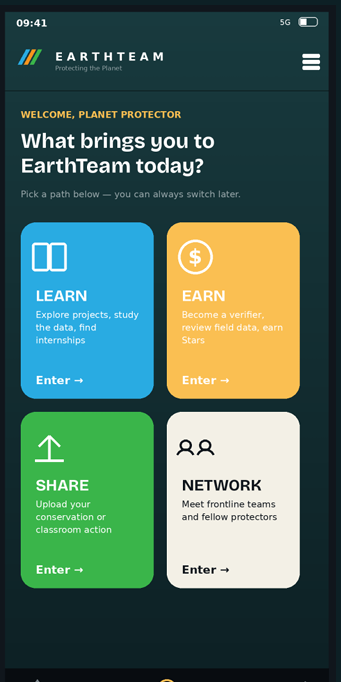
Layout A — Explore as a block
Keep the four tiles (Learn / Earn / Share / Network) and add a wide Explore block beneath them. Nothing is removed; the Lobby is slightly busier.
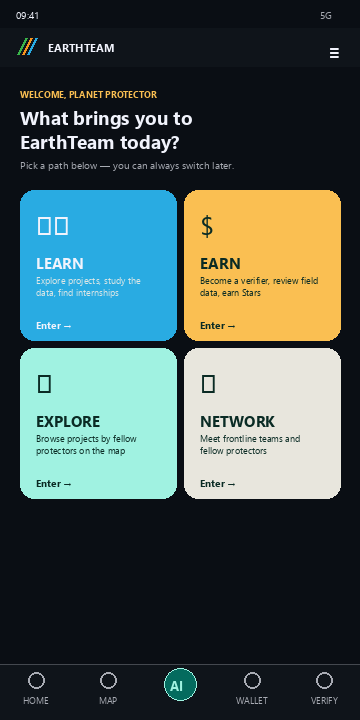
Layout B — Explore replaces Share
Tiles become Learn / Earn / Explore / Network. Why drop Share? Share and Earn both lead to Add Project — Earn's “add a project” CTA already covers the Share intent, so the Share tile is redundant. Dropping it frees a clean 2×2 slot for Explore, which otherwise has no Lobby entry.
A third option (not recommended)
Replace the Earn tile with Verify. Rejected: Verify already lives in the bottom nav bar, so it'd be repetitive — whereas the Map (Explore) has no entry point besides the nav bar, so surfacing it in the Lobby adds genuinely new reach.
3 · SUB-FLOW A
Add Project — two ways in (Option 1: the form · Option 2: Speed up with AI)
Option 1 is the existing 6-step form — fill it yourself.
Option 2 is a “⚡ Speed up with AI” toggle at the top of that same form: upload a PDF/image or
paste a link → the ingestion service reads it → the next screen is the same form, prefilled.
AI never auto-publishes — you review and edit every field before submitting.
4 · SUB-FLOW B
Onboarding revamp — prefill from LinkedIn / website
Replaces today's monotonous multi-step form with a prefill-first flow and a single review
screen. Security gate: link domain vs. verified e-mail domain, https-only, public data only, rate-limited.
6 · STILL OPEN
Decisions carried forward & build order
Open decisions (slide 11)
- Lobby every session vs. default-hallway skip — recommend: every session until the user sets a default
- gAia in-hallway vs. standalone tab — Variant A keeps the tab
- “Solutions” vs. “Miracles” vs. “Magic” naming
- CTOC portal URL(s) — needs content owner
- Internships source (Learn tile copy) — nothing in-app today
Build order
- ① Lobby + redirect + hamburger entry
- ② Earn hallway + Learn preset (pure frontend)
- ③ Smart-import + onboarding revamp (backend pair)
- ④ Partners directory
- ⑤ Nav Variant B restructure — once hallways prove out
New backend needed
/v2/projects/extract/— doc/URL → structured project fields/v2/onboarding/enrich/— public LinkedIn/site data + domain check/v2/partners/— org profiles + per-org stats (interim: hardcoded)- List-view filter params (
projectType,org)